

Invoicing & Billing Software for All Contractors
Silkroad provides contractor invoicing and billing software service that connects invoices directly to jobs, materials, field activity, and operational workflows. It ensures accurate billing, faster payments, and complete revenue capture while eliminating operational gaps across every project stage and workflow.
What Is Invoicing & Billing Software?
Invoicing and billing software helps contractors create, manage, and follow invoices for work that’s already done. It converts the effort from the field into revenue that can be billed, collected, and also recorded, so nothing slips away.
For contractors, billing shows up after the job is done. Materials get tracked in one place, field updates come through texts and quick notes. Change orders get scribbled on paper. Meanwhile, office staff spend hours rebuilding invoices from bits and pieces of information.
SilkRoad takes a different path. Rather than seeing invoicing as this standalone paperwork thing, it links billing right to jobs, materials, timetables, on-site activity, and those operational workflows.
Most Revenue Leaks Happen Before the Invoice Gets Sent
Most contractors don’t lose revenue by forgetting invoices, but because billing details never reach them. Missing material logs, undocumented extra work, and delayed job data create silent revenue leakage that steadily reduces overall profitability.

Unbilled Materials
Materials used on jobs never make it onto invoices, reducing revenue and shrinking job margins.

Missed Change Orders
Additional work gets completed in the field but is never documented or billed properly.

Delayed Invoicing
Invoices are created days or weeks after work is completed, slowing cash flow.

Field-to-Office Gaps
Important billing details remain trapped in calls, texts, and conversations.

Manual Billing Workflows
Office teams spend valuable time rebuilding invoices from disconnected information.

Missing Labor Visibility
Additional labor hours are completed but never properly connected to billing.

Connect Billing to Real Field Operations
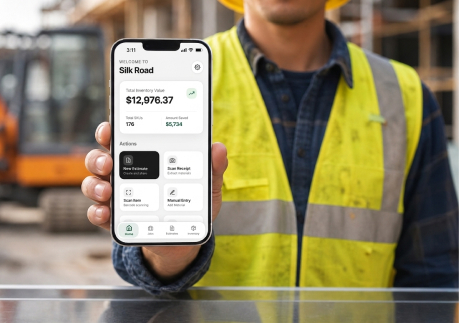
SilkRoad connects jobs, inventory, field activity, estimates, schedules, and invoices into one operational workflow.
Instead of waiting until a project is complete to gather billing information, contractors can keep materials, labor activity, job updates, and field documentation connected throughout the job lifecycle. This makes it easier to invoice accurately, reduce administrative work, and identify revenue leaks before they impact profitability.
Billing Tools That Help Capture More Revenue
Generate Invoices Directly from Completed Jobs
- Convert jobs into invoices
- Keep billing tied to job activity
- Reduce duplicate data entry
- Improve invoice accuracy
- Speed up billing workflows
Capture Materials Before They Get Missed
- Track billable materials
- Connect inventory to invoices
- Reduce missed material charges
- Improve operational visibility
- Capture more billable work
Keep Field Changes Connected to Billing
- Track change orders
- Connect field updates to invoices
- Improve billing transparency
- Reduce missed labor charges
- Document additional work clearly
Keep Estimates, Jobs, and Billing Connected
- Convert approved work into invoices
- Keep estimate details connected
- Preserve pricing and scope visibility
- Reduce administrative work
- Improve operational consistency
Simplify Customer Billing and Payment Collection
- Send invoices digitally
- Track payment status
- Organize billing history
- Improve customer communication
- Reduce billing delays
Track Labor Hours Before Revenue Gets Lost
- Track billable labor hours
- Connect timecards to invoices
- Improve labor visibility
- Reduce missed labor charges
- Capture completed work accurately
Billing Shouldn't Be Separate From Operations
Billing is often treated like the last step of a project. But billing starts the moment the work does. Every material that gets used, every crew that is dispatched, each field update that is written down, and every change order that is approved, all of that ends up shaping what shows on the invoice later.
If billing runs separately from the rest of the business, then details start to disappear, and those revenue leaks get harder to spot.
SilkRoad ties day-to-day operations straight into billing workflows, so contractors can trace the work from approval to payment, without losing sight of it in between.





-
 Estimate & Approved
-
 Job Scheduled
-
 Materials Allocated
-
 Field Work Completed
-
 Change Order Recorded
-
 Invoice & Payment
Built Around Real Contractor Billing Workflows
SilkRoad was built on over 30 years of real trade and field experience across electrical and general maintenance operations. We designed the platform around how contractor businesses actually operate in the field, not around generic software workflows that add complexity to daily operations.
- Built for all contractors
- Mobile-first workflows
- Fast implementation
- Connected inventory and jobs
- Designed for crews to actually use
- Field-tested workflows
What Better Billing Visibility Looks Like
- Capture More Billable Materials: Ensure materials used in the field make it onto invoices.
- Reduce Missed Change Orders: Keep additional work connected to billing workflows.
- Speed Up Invoicing: Generate invoices faster with connected operational data.
- Improve Billing Accuracy: Reduce errors caused by missing information and manual entry.
- Reduce Administrative Work: Spend less time rebuilding invoices from multiple sources.

Billable materials

Change orders

Faster invoicing

Billing accuracy

Less admin

Turn Completed Work Into Captured Revenue
SilkRoad helps contractors connect jobs, materials, schedules, field activity, documentation, and invoices into a single operational workflow. By keeping billing directly tied to work being performed in the field, contractors can reduce missed billables, improve invoice accuracy, and speed up payment collection.
This connected system also provides clear visibility into where revenue may be leaking, allowing issues to be identified and resolved before cash flow is impacted or lost across projects.
Connect work to billing with SilkRoad to reduce missed billables, improve accuracy, and get paid faster.
Frequently Asked Questions
Can invoices connect directly to jobs?


Yes. SilkRoad allows contractors to generate invoices directly from completed jobs while keeping activity, materials, and documentation connected.
Does SilkRoad track billable materials?
Yes. Materials can be connected to jobs and invoices, helping contractors reduce missed material charges.
Can field activity connect to invoices?
Yes. Job updates, field notes, and operational activity can remain connected throughout the billing workflow.
Does SilkRoad support change orders?
Yes. Contractors can track change orders and additional work so they remain visible during invoicing.
Can invoices be generated from approved estimates?
Yes. Approved estimates can flow directly into jobs and billing workflows without recreating information manually.
Get Your Custom Revenue-driven Growth Strategy
Have questions or need assistance? Our team is here to help you every step of the way.
Get in touch
Please enter your details to create a new account.
By contacting us, you agree to your Terms of Service and Privacy Policy
Copyright © Silkroad 2026