

Mobile Field Service Software for All Contractors
Mobile field service software for contractors that gives crews instant access to jobs, schedules, inventory, site notes, photos, and updates from anywhere. Keep office, trucks, and job sites fully connected in real time so work stays organized, efficient, and on track from start to finish.
What Is Mobile Field Service Software?
Mobile field service software gives contractors and field crews access to the information they need while work is happening in real-time. Instead of depending on phone calls, paperwork, texts, or memory, crews can pull up schedules, job specifics, inventory, photos, notes, and even quick status updates straight from their mobile devices.
For contractors, the important job info ends up scattered across too many spots. Schedules shift throughout the day, photos sit on someone’s personal phone, field notes disappear, and the office team can’t get a clear view of what is going on with active jobs.
SilkRoad links field operations directly to the work itself, like jobs, inventory, scheduling, documentation, and invoicing.
Most Field Communication Happens Through Scattered Texts and Calls
The field moves fast, crews switch jobs, customers call with updates, materials get picked up on the way to a project, and photos are taken throughout the day. When information is shared through texts, calls, emails, and personal notes, important details become difficult to track.

Missing Job Information
Crews arrive without updated instructions, job details, or important site information.

Photos Lost in Camera Rolls
Documentation stays on personal phones and never reaches the office or the billing process.

Delayed Field Updates
Office teams struggle to understand job progress while work is happening.

Inventory Blindness
Field crews can't easily see what materials are available across trucks, warehouses, and jobs.

Communication Overload
Simple updates require multiple calls, texts, and follow-up conversations.

Disconnected Documentation
Notes, photos, and updates are stored in different places instead of being connected to the job.

Keep Field Crews Connected to Real Operations
SilkRoad connects jobs, schedules, inventory, photos, field updates, and operational workflows through a mobile-first system built for contractors. Instead of relying on disconnected communication, crews can access the information they need from anywhere work is happening.
Every update, photo, material movement, and field note stays linked to the job, improving coordination, reducing delays, and giving contractors better visibility across the entire operational chain from start to finish.
Mobile Tools That Keep Crews Connected
Access Job Information from Anywhere
- View job details from the field
- Access schedules and assignments
- See customer and property information
- Review site instructions and updates
- Reduce office-to-field communication gaps
Record Field Activity as Work Happens
- Record field updates instantly
- Store jobsite notes centrally
- Improve crew communication
- Track work progress in real time
- Reduce missed information
Keep Jobsite Photos Connected to the Work
- Upload jobsite photos instantly
- Store documentation by job
- Capture change order proof
- Improve warranty tracking
- Connect photos to invoices and jobs
Track Inventory from the Field
- View available inventory
- Track material usage
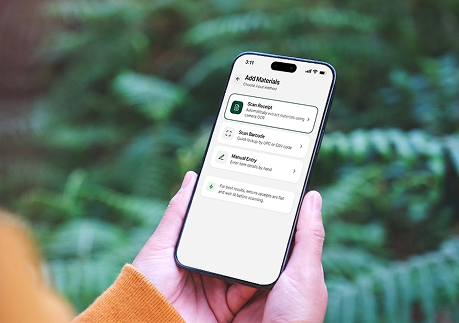
- Scan materials from mobile devices
- Improve field inventory visibility
- Reduce duplicate buying
Keep Crews Updated Without the Phone Tag
- Mobile schedule updates
- Dispatch notifications
- Real-time crew coordination
- Faster communication
- Reduce missed schedule changes
Capture Time and Labor Activity in the Field
- Mobile timecard entry
- Track labor by job
- Improve payroll visibility
- Connect labor to operations
- Reduce administrative work
Mobile Field Workflows Connected to the Entire Operation
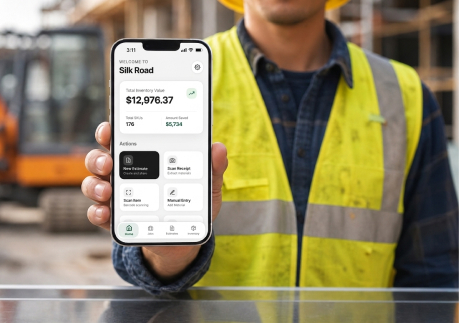
Mobile tools should do more than share information. They should seamlessly connect field activity directly to jobs, materials, scheduling, documentation, and invoicing systems.
When field updates remain disconnected, visibility breaks down, and critical information can easily get lost between the office and the jobsite, causing delays and rework. SilkRoad keeps field operations continuously connected to office operations in real time, ensuring every update is captured and shared instantly.
This helps contractors maintain full operational visibility, improve coordination, reduce errors, and streamline workflows from the first job assignment all the way through to final billing and project completion.




-
 Job & Crew Assigned
-
 Materials Scanned On-Site
-
 Photos Uploaded
-
 Field Notes Recorded
-
 Job Completed
-
 Invoice & Payment
Built for Real Contractor Field Workflows
SilkRoad was built on over 30 years of real trade and field experience across electrical and general maintenance operations. We designed the platform around how contractor businesses actually operate in the field, not around generic software workflows that add complexity to daily operations.
- Built for all contractors
- Mobile-first workflows
- Fast implementation
- Connected inventory and jobs
- Designed for crews to actually use
- Field-tested workflows
What Better Mobile Field Operations Look Like
- Faster Field Communication: Share updates without relying on endless calls and texts.
- Better Crew Coordination: Keep teams aligned with current schedules and job information.
- Improved Job Visibility: See what is happening across active jobs in real time.
- Better Inventory Tracking: Keep materials connected to crews, jobs, and field activity.
- Reduced Administrative Work: Spend less time chasing updates and rebuilding information.

Instant Updates

Team Alignment

Real-Time Insight

Material Control

Less Admin

Keep Your Field Operations Connected in Real Time
SilkRoad helps contractors manage field communication, schedules, inventory, job updates, documentation, and labor activity through one connected mobile workflow. By keeping every part of operations seamlessly connected between the office, trucks, and jobsites, contractors gain real-time visibility into daily field activity.
This reduces communication gaps that often cause delays, errors, and missed information, while improving coordination, accountability, and efficiency across teams.
Get started with SilkRoad today to streamline operations, strengthen field control, and keep every job moving forward smoothly.
Frequently Asked Questions
Can crews update jobs from mobile devices?


Yes. Crews can record updates, notes, photos, and job activity directly from the field.
Can crews use SilkRoad from the field?
Yes. SilkRoad is designed as a mobile-first platform for contractors and field teams.
Can photos be uploaded from jobsites?
Yes. Photos can be uploaded directly to jobs and connected to documentation, change orders, and invoices.
Can inventory be tracked from mobile devices?
Yes. Crews can view, scan, and update inventory directly from trucks and jobsites.
Does scheduling update in real time?
Yes. Schedule changes and dispatch updates can be shared instantly with field crews.
Get Your Custom Revenue-driven Growth Strategy
Have questions or need assistance? Our team is here to help you every step of the way.
Get in touch
Please enter your details to create a new account.
By contacting us, you agree to your Terms of Service and Privacy Policy
Copyright © Silkroad 2026