


How Concrete Contractor Software Helps Reduce Material Waste
Summary The benefits that concrete contractor software provides are best realised when it integrates all aspects of material…
TABLE OF CONTENTS
Contractor accounting software is an important component for keeping track of your invoices, expenses, and accounting. However, your accounting system alone will not give you any visibility into the productivity, materials being used, and operations on the ground. As your construction company grows, it will become harder to keep up with the gap between accounting systems and operations. Explore where QuickBooks can help you, where the blind spots start forming, and why contractor-specific job management software is needed.
For most contractors, QuickBooks has been a long-standing part of the business, handling their invoicing, expense management, payables and receivables, and overall financial record keeping. On an accounting level, QuickBooks fills an essential function.
The problem is that financial data provides a partial view. The contractor might know exactly how much money their business earned last month, but be unable to respond to the operational issues of what projects were the most profitable, why some materials cost more than anticipated, or why certain projects take longer than expected.
With growing businesses, complexity is increasing. There are more crews, more projects, and more material movements to track, and all things accounting was not intended to handle. Financial reporting explains what has already happened. Not everything about the cause and effect of the occurrence is explained by this definition.
This is becoming critical to those contractors who wish to gain insight into the current situation, rather than just analyse the results of their projects.
The main reason why QuickBooks is still one of the most popular accounting software packages is that it fulfils its primary role very effectively. Financial management has relied on it as a solid platform for many years.
The benefits mentioned above allow contractors to keep track of their finances without any hassle and to simplify their accounting process. They will be able to view cash flow, see pending invoices, and prepare their financial statements without using various accounting systems.
Why Contractors Keep Using It
There are several reasons why contractors continue to use QuickBooks.
For accounting purposes, QuickBooks continues to provide significant value. Most contractors are not looking to replace the financial capabilities that already work well.
The limitations typically appear outside the accounting function, where day-to-day operations generate information that accounting software was never intended to capture.
Running construction projects requires information that extends far beyond financial transactions.
The invoice will provide information regarding how much the customer was billed for. However, it will not indicate how effectively the job was done, whether there were sufficient materials for the crews, or whether the costs adhered to the initial estimate.
As businesses grow, these operational questions become just as important as financial reporting.
Many contractors eventually discover that they manage critical operational information outside their accounting software.
Common gaps include:
Instead of working from one connected system, information becomes spread across spreadsheets, emails, whiteboards, text messages, and conversations between office staff and field crews.
When operations rely on disconnected systems, businesses often experience:
None of these challenges is an accounting problem.
They are operational problems that accounting software simply was not designed to solve.
Many contractors reach a point where QuickBooks continues managing finances successfully while almost every operational process takes place somewhere else.
The result is duplicated work, inconsistent information, and limited visibility into projects while they are actively underway.
Contractor-focused platforms are designed around how construction businesses actually operate.
Rather than focusing exclusively on financial transactions, they connect the activities happening throughout the business into one operational workflow.
A contractor-specific platform typically includes features such as:
Each of these processes supplies valuable information that enables contractors to gauge project progress prior to preparing financial statements.
For instance, when crews report on the progress of their work in the field, managers are instantly informed of progress rather than having to wait for work to be completed.
When material inventory is tied to the projects, materials management is much simpler throughout the project cycle, rather than waiting weeks for reconciliation.
Scheduling data, customer history, and field records are all tied into each project, providing an operational history of the project from estimation through completion.
Connecting operational information creates several practical advantages.
The objective is not to replace accounting software.
Instead, contractor-specific job management software complements contractor accounting software by providing the operational context behind every financial result.
Accounting explains what happened financially.
Operations explain why it happened.
When both work together, contractors gain a much clearer understanding of business performance than either system can provide on its own.
The return on investing in contractor accounting software that extends beyond financial management is rarely tied to a single feature. Instead, the value comes from improving multiple operational processes that affect profitability every day. While accounting software helps record completed transactions, contractor-specific job management software helps reduce inefficiencies before they become financial problems.
Reduced duplicate material purchases
With inadequate visibility for inventories stored in warehouses, transported in trucks, and being used on the job sites, the contractors tend to purchase materials that they already have.
Better inventory accountability
When materials are linked to specific jobs and inventory movement is documented, contractors gain a clearer understanding of where inventory is being used and where discrepancies occur.
Less administrative work
Contractors often find themselves investing many hours entering the same data into estimating programs, spreadsheets, accounting packages, and on-site tools. The connected process helps eliminate redundant data input via information flow throughout the project’s lifecycle.
Quick access to project information
Rather than sifting through emails, texts, paperwork, and various software programs, office and field personnel can work off a centralised set of project documents containing customer information, scheduling information, and the history of the project.
Visibility into the project
Managers can monitor active projects without relying entirely on phone calls or manual status updates. Better visibility supports faster decision-making when priorities change.
More efficient workflows
When estimating, scheduling, inventory, field documentation, and job management operate within the same workflow, teams spend less time coordinating information and more time completing work.
The operational improvements often extend well beyond the software itself.
Businesses typically experience:
These changes can have more of an effect on contractors’ businesses compared to the savings in accounting because they deal with what creates the accounting in the first place.
Even if the software is very effective, it will be of less use if it is not implemented properly.
One of the biggest worries for contractors when deciding to change their systems is implementation. Many have experienced software that promised operational improvements but introduced complicated processes that slowed everyone down.
These concerns are understandable, particularly for businesses that cannot afford lengthy downtime while learning a new platform.
Successful implementations usually prioritise simplicity over complexity.
Contractors typically value:
The goal is not simply to introduce new software. It is giving teams tools they are willing to use every day because the workflows make their jobs easier rather than more complicated.
Successful adoption depends just as much on usability as functionality.
Many contractors continue using accounting software successfully for years before realizing operational complexity has outgrown the systems supporting it.
Several warning signs indicate that financial reporting alone is no longer providing enough visibility into the business.
None of these problems necessarily reflects poor management.
Instead, they often indicate that the business has reached a size where operational processes require the same level of structure as financial management.
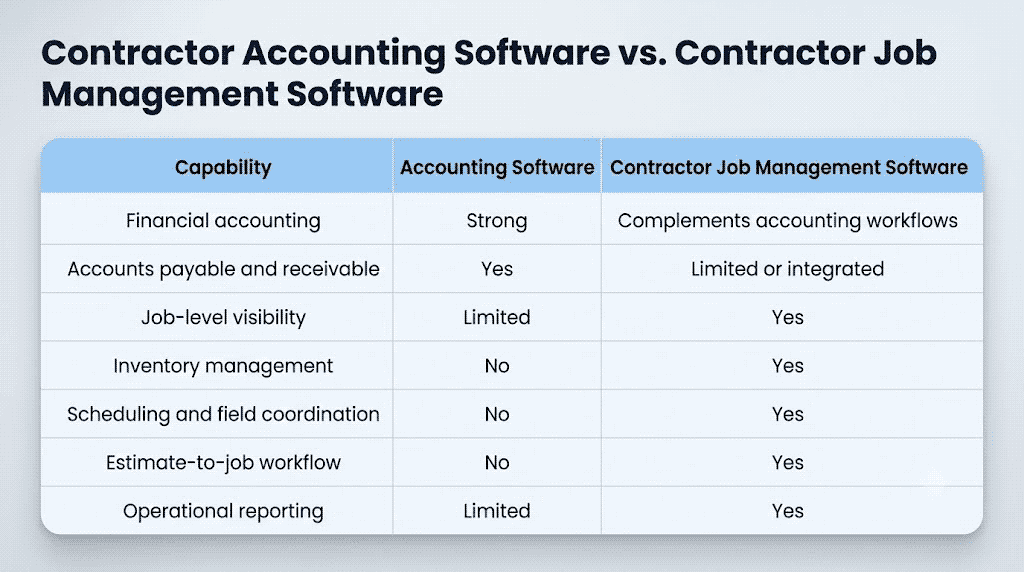
Rather than replacing accounting software, job management software for contractors fills operational gaps that accounting software was never intended to handle.
Together, the two types of software offer a comprehensive view of performance from financial to operational.
Accounting software tells contractors what has happened.
Operational software tells them what is happening now.
As construction companies grow, combining job data, inventory data, field activity, scheduling, customer information, and project performance becomes increasingly important. Contractors that have access to both financial data and operational data will usually be better equipped to improve efficiency, protect profit margins, and make smart decisions before the problem affects their bottom line.
SilkRoad App helps contractors tie operations, inventory, project execution, and field activities into one operational software solution.


Nelia Madeira is the Co-Founder and Chief Financial Officer (CFO) of SilkRoad Trades , a construction technology company dedicated to helping specialty contractors simplify inventory management, optimize field operations, improve job costing, and increase profitability.
With more than 20 years of hands-on experience in construction operations, accounting, office management, and business...


QuickBooks gives excellent accounting functionality such as invoicing, expenses, payable and receivable accounting, reconciliation of banks, and financial reporting. But it does not give adequate information on job management, inventory, scheduling, field activities, and performance management, which is needed by many contractors.
Job-level visibility will be enhanced by ensuring that the project information, inventory tracking, schedules, history of customer sites, and field updates are captured using one integrated platform rather than disconnected spreadsheets and applications.
It will help reduce duplications in buying, ensure good accounting of materials, enable better purchasing decisions, and allow for better costing of projects.
Contractors should evaluate implementation time, ease of use, mobile accessibility, integration capabilities, role-based access, pricing transparency, and whether the software supports both office staff and field crews with practical workflows.
Connected workflows reduce manual data entry, improve communication between office and field teams, provide better visibility into active jobs, streamline project coordination, and help contractors make faster, more informed operational decisions.
Contractor Software

Summary The benefits that concrete contractor software provides are best realised when it integrates all aspects of material…
Nelia Madeira
20 Nov 2026
Job Management

Summary Service business management software delivers the most value when customer management and job logistics work together without…
Nelia Madeira
13 Nov 2026
Contractor Software

Summary Trade contractors can benefit from business process automation software to automate their inventory ordering decisions to avoid…
Nelia Madeira
11 Nov 2026
Have questions or need assistance? Our team is here to help you every step of the way.
Simplify material tracking and reduce revenue leakage across your job sites.
By contacting us, you agree to your Terms of Service and Privacy Policy
Copyright © Silkroad 2026
