


How Concrete Contractor Software Helps Reduce Material Waste
Summary The benefits that concrete contractor software provides are best realised when it integrates all aspects of material…
TABLE OF CONTENTS
It is common for roofing contractors to handle inventory at warehouses, in trucks, and on jobsites at the same time. Without an inventory tracking system that logs each transaction that takes place, moving inventory from one location to another becomes a problem that can result in inventory errors, incorrect cost estimations of jobs, and even the purchase of unnecessary materials. Roofing contractor software has made the work of estimating, scheduling, and managing projects easy, but not inventory transactions. We will discuss how the roofing contractors can manage inventory transfer from one location to another.
Roofing jobs present problems concerning inventory management that are not encountered by many other construction jobs. Materials are brought straight to the site, transferred between crews, put back into inventory, or taken to other jobs as scheduling demands change.
Think about a typical situation. A roofing job has ended, and some bundles of shingles remain. Instead of sending them back to inventory, the crew moves them directly to another roofing job. The second crew gets to use the material, but without any documentation, the inventory is already incorrect. The first project appears to have consumed more materials than it actually did, while the second project received inventory without any recorded allocation.
The problem is not the transfer itself. Reusing materials is often the most efficient decision. It becomes complicated when the movement of inventory takes place outside the system that is used by contractors to control their business processes.
In the growth of roofing companies, the location of the inventory is not fixed at one warehouse anymore; it can be found at several trucks, jobsites, temporary holding sites, and even return material staging facilities. In the absence of visibility into where the inventory can be located, contractors will waste valuable time looking for the inventory, buying materials that they already possess, or reconciling inventories post the completion of projects.
For businesses using roofing contractor software, inventory management is not only about the quantity of the material but also about the location of the material.
Roofing operations involve large quantities of materials moving between several locations throughout the lifecycle of a project.
As opposed to companies with a single warehouse, roofers are always moving the inventory around so as to ensure that their work is done on time. The inventories could move from the warehouse to one project, then to another, then finally back to the warehouse.
Each movement affects inventory accuracy. If the movement is logged through telephone conversations, text messages, or oral communications rather than through a systemised process, the visibility of the inventory will soon be compromised.
This could result in ordering supplies that are present elsewhere in the organisation or spending a considerable amount of time searching for the inventory before starting the next job.
The available roofing contractor software works well for estimating, scheduling, customer management, and project tracking. The software allows roofing contractors to run their business smoothly and efficiently.
The visibility gap in most roofing contractor software usually appears when materials begin moving between locations.
With increasing growth in operations, this issue becomes increasingly hard to handle. For instance, the team knows that they have moved their surplus flashing or underlayment to another site, but without proper documentation, there will be no proper tracking of the materials’ location within the office.
Such inefficiencies in tracking materials influence the purchase and scheduling process. The contractor ends up spending valuable time either locating or buying new materials.
This lack of visibility affects purchasing decisions, scheduling, and overall operational efficiency. Contractors may spend time searching for materials or buying replacements simply because existing inventory cannot be located.
Knowing inventory quantities is only part of the equation. Contractors also need visibility into where materials are located throughout every stage of a project.
Every documented transfer within an inventory tracking system creates a clear record of where materials moved, when they were transferred, and which project received them. Instead of relying on memory or informal communication, contractors gain a complete history of inventory movement across the business.
Inventory transfers affect far more than stock counts. They directly influence project costing and profitability.
When materials are transferred without being recorded, the original project may appear to have consumed inventory it never actually used, while the receiving project benefits without reflecting the true material cost.
Tracking transfers properly gives contractors a more accurate picture of material usage across multiple projects. It also improves reporting, supports better estimating, and provides greater confidence when reviewing completed jobs.
Roofing businesses move equipment just as frequently as they move materials.
Tracking equipment locations alongside inventory through an inventory tracking system improves accountability across the business. The contractors can know which crew is using the asset, what location the asset is at, and when the rental equipment has to be returned.
Visibility will help to cut unnecessary rental expenses, eliminate the problem of misplaced equipment, and make it easier to find the asset in case a future project requires it.
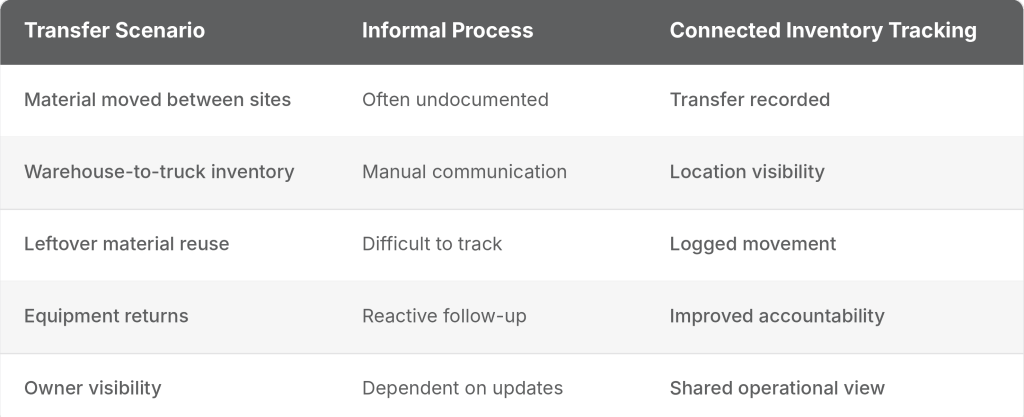
While roofing contractors expand, the management of inventory will go beyond counting the materials. Each movement from one warehouse to another, trucks to warehouses, warehouses to job sites, and job sites to trucks influences inventory accuracy, job visibility, and operational efficiency.
A good inventory tracking system helps contractors gain visibility on where materials and equipment are located, how inventory moves between different projects, and which crews use what assets. Thus, the inventory system will help to avoid the purchase of unnecessary materials, enhance job costing, and keep projects going smoothly without being delayed due to a lack of inventory visibility.
SilkRoad App is a roofing contractor software that helps roofing contractors blend inventory visibility, job tracking, and operations within one system.


Nelia Madeira is the Co-Founder and Chief Financial Officer (CFO) of SilkRoad Trades , a construction technology company dedicated to helping specialty contractors simplify inventory management, optimize field operations, improve job costing, and increase profitability.
With more than 20 years of hands-on experience in construction operations, accounting, office management, and business...


Multi-location inventory tracking allows roofing contractor software to track inventory across warehouses, trucks, job sites, and temporary storage locations from a single system.
It’s because they help the contractor to know what is going on, since there will always be movements of inventory during the day. In addition, without this visibility, the contractor will not be able to keep track of the inventory.
The materials being moved between job sites should be recorded in an inventory tracking system, including the material, source location, destination, and associated project.
This will ensure that materials are allocated to specific jobs, and this helps contractors to estimate the profits of the projects.
The roofing contractor needs to keep a tab on the inventory available in warehouses, delivery vehicles, working sites, temporary storage locations, locations where materials have been returned to, and anywhere else materials/equipment may be stored.
By having a clear picture of inventory in all locations, contractors will be able to check the existence of materials in their possession before making any purchase orders.
Certainly, modern inventory management systems are able to track both materials and equipment like scaffolds, ladders, lifts, safety wear, and hired equipment.
Contractor Software

Summary The benefits that concrete contractor software provides are best realised when it integrates all aspects of material…
Nelia Madeira
20 Nov 2026
Job Management

Summary Service business management software delivers the most value when customer management and job logistics work together without…
Nelia Madeira
13 Nov 2026
Contractor Software

Summary Trade contractors can benefit from business process automation software to automate their inventory ordering decisions to avoid…
Nelia Madeira
11 Nov 2026
Have questions or need assistance? Our team is here to help you every step of the way.
Simplify material tracking and reduce revenue leakage across your job sites.
By contacting us, you agree to your Terms of Service and Privacy Policy
Copyright © Silkroad 2026
